Install
- Open Windy's Plugins menu. On windy.com or in the Windy mobile app, open the menu and choose Install Windy Plugin (the snake icon).
- Find and install. Search IFR Planner in the gallery list and tap Install.
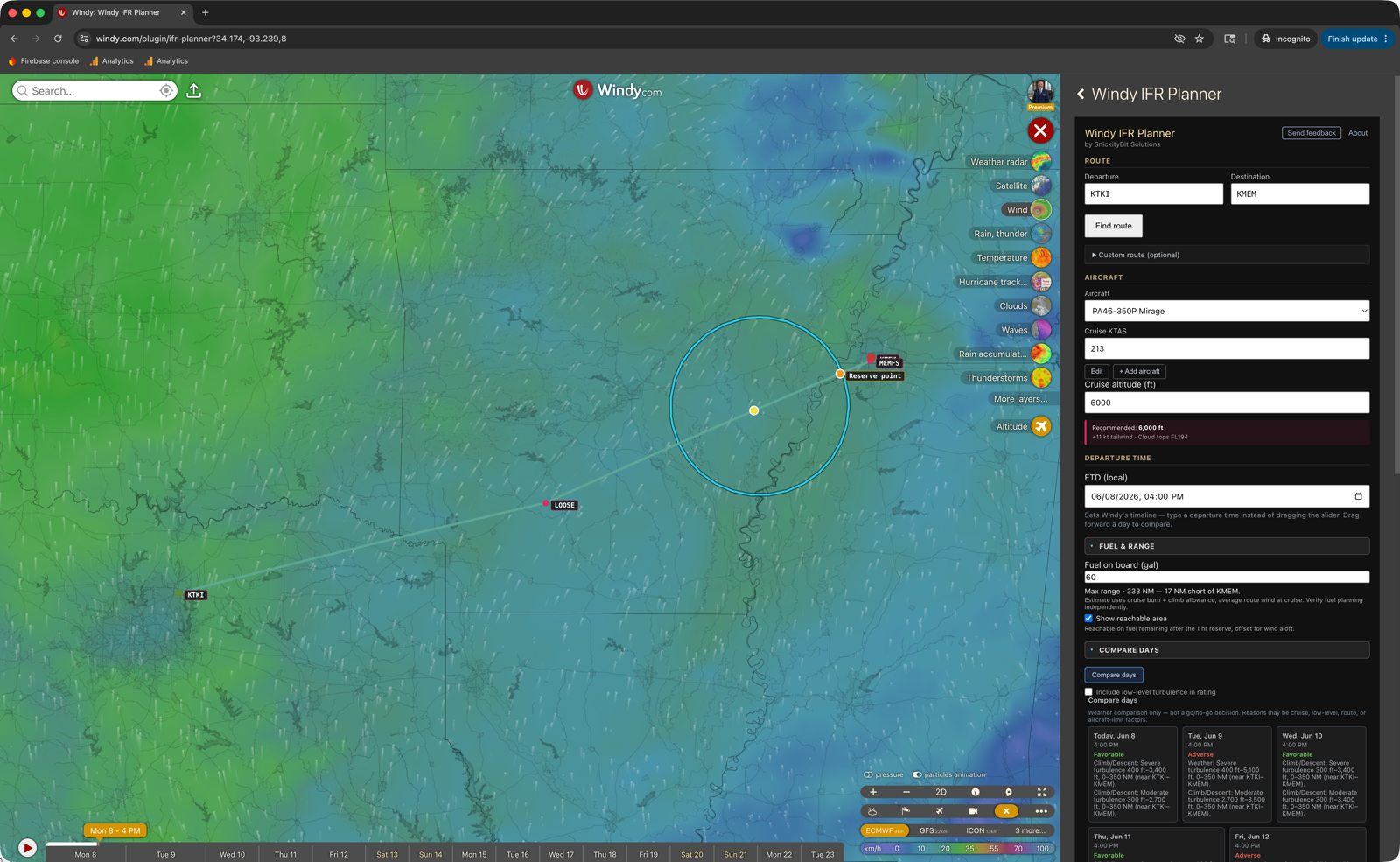
- Open Windy IFR Planner. Launch it from Windy's plugin menu, enter your departure + destination ICAOs, pick an aircraft, set a cruise altitude, click Find route. You're flying.
Don't see it in the gallery yet, or on iPad Safari? Install by URL
A new release can take a little while to appear in the gallery. In the meantime — and any time you're in a desktop browser or Safari on iPad — you can install directly by URL. (iPhone Safari can't display the plugin panel, so on iPhone use the Windy app and the gallery steps above.)
- Open Windy's developer panel. Go to windy.com/dev. The developer panel appears over Windy's normal map view.
- Paste the plugin URL. In the plugin URL field, paste:
Click Install & open plugin.https://windy-plugins.com/14161593/windy-plugin-ifr-planner/0.18.0/plugin.min.js - Approve the plugin. Windy may ask you to confirm. Click through; the plugin is open source and read-only.
- Open Windy IFR Planner. From Windy's plugin menu, launch Windy IFR Planner, enter your departure + destination ICAOs, pick an aircraft, set a cruise altitude, click Find route.
Windy plugins run client-side in your browser. We don't see your routes, your aircraft, or any other data. Plugin source is open and inspectable.
What's Inside
Real IFR routes
FAA Preferred Routes with confidence scores. Each route is parsed into actual named fixes from the FAA NASR database — your polyline kinks through FORCK, MERDN, ORRKK like a real flight plan, not a great-circle line.
Vertical profile
Terrain, cloud layers, icing zones, turbulence bands, freezing level, winds aloft. Hover anywhere to see what you'd encounter at that point along the route at any altitude. Set the chart's top altitude — or let it auto-fit your cruise — so a low-level flight isn't squished into the bottom of the chart. A collapsible legend explains every overlay color and hatch.
Per-waypoint forecast timing
Each waypoint on your route is analyzed against the forecast hour at its own computed arrival time — ETD plus distance over cruise speed. Drag Windy's time slider to set your departure time; the destination and every fix in between get the forecast for when you'd actually be there, not for "right now." Drag the slider forward a day at a time to find the best day to fly your route. Cruise speed is editable per-aircraft so you can plan at your real operating numbers, not the POH book value.
Compare days
One tap compares the next three departure days at your ETD hour and gives each a Favorable / Mixed / Adverse weather read, with the two biggest factors tagged by phase (cruise, climb/descent, aircraft limit). Tap a day to load its full profile. Weather comparison only — not a go/no-go decision.
Prioritized advisories
Critical / warning / info advisories by category — icing, turbulence, terrain, clouds, freezing, aircraft. Icing and turbulence call out where along the route they hit — altitude band, distance range, and the nearest fixes (e.g. "Severe icing FL145–FL248, 200–760 NM, near FSM–KATL"). Capped at 5 most-actionable, plus a 3–5 sentence pilot summary.
Aircraft envelope
Magenta climb-cruise-descent overlay on the chart driven by your aircraft's POH data. Cruise altitude is held within the selected airframe's service ceiling, plus short-route truncation warnings.
Fuel & range
Enter your fuel on board and see how far you can reach along the route — reachable with margin to spare, or a reserve point dropped on the line where you'd hit your 1-hour reserve. A wind-adjusted reachable-area ring overlays where today's winds aloft and your remaining fuel can actually take you, and it shrinks as you scrub down the route. Range accounts for each aircraft's usable fuel plus its cruise and climb fuel flows. Strategic estimate — verify fuel planning independently.
Add & edit aircraft
Dozens of types ship preloaded — Piper, Cirrus, Cessna, Beechcraft, Mooney, Diamond, Van's, turboprops (TBM, PC-12, Caravan, Kodiak, King Air) and light jets — but they're yours to change. Correct any performance number for your airframe (cruise/climb speed, service ceiling, fuel burn, usable fuel, climb fuel flow), or add a type we don't ship. Edits are saved on your device; built-ins reset to defaults anytime.
Cruise recommendation
"Recommended: FL250 — +19 kt tailwind, no icing, cloud tops FL220." Scoring weighs wind benefit, icing/turbulence avoidance, terrain clearance, and aircraft ceiling.
Route comparison
Compare all candidate routes by tailwind, icing exposure, turbulence exposure, terrain margin. Alternates render as gray dashed lines on the map alongside your active route.
Map ↔ chart sync
Hover the chart — a yellow marker tracks the position on the map. Hover the colored polyline on the map — the chart's crosshair moves with you.
Real Windy weather
ECMWF, GFS, ICON, and Windy's other weather models. Switch models from Windy's normal controls; the plugin re-samples from whatever's currently active.
Export
One-tap deep link into ForeFlight with the route + altitude pre-loaded. Download a .fpl for Garmin Pilot or any EFB that imports the format. Or copy the cleaned route string straight to clipboard for ATC, dispatch, or pasting into anything else. GA fields with FAA local identifiers (2F0, 3R4) resolve in search and hand off to ForeFlight by their real id.
Feedback Welcome
Bug reports, feature requests, and general feedback are the most useful thing you can send us.
Email feedback@snickitybit.com
- Bug report: include the route (departure + destination), aircraft, cruise altitude, browser, and a screenshot if visual.
- Feature request: we're especially interested in ideas for the route optimization scoring weights, aircraft profiles, and decision-support advisories.
- General feedback: what works, what doesn't, what surprises you.
Privacy & Telemetry
The plugin sends a small amount of anonymous telemetry so we can improve it:
- Usage events — when you open the plugin, compute a route, switch aircraft, change cruise altitude, click Compare routes, or accept a recommendation. Plus the plugin version. Goes to Firebase Analytics (Google).
- Crash reports — JavaScript errors and unhandled promise rejections, including the message + stack trace + browser user agent + plugin URL. Goes to our Firestore database.
- Feedback submissions (opt-in per submission) — only when you tap Send feedback in the plugin and click Send. The submission includes: the text you wrote, an optional email if you provided one, plus context about your current session — departure/arrival ICAOs, aircraft, cruise altitude, plugin version, browser user agent, and the Windy URL you were on. Goes to our Firestore database. We use the email only to reply to you, never share it.
What we never collect outside an explicit feedback submission: your airport ICAOs, route strings, aircraft type, cruise altitude, location, or any other identifiable information. Usage events and crash reports are anonymized at the source — no account or cookie ID. We also do not store your IP address with feedback submissions.
What feedback analytics tracks: only that you opened the form, that a submission succeeded, or that a submission failed. We do not log keystrokes, typing speed, or any partial draft — the contents of the form never leave your browser until you tap Send.
Prefer not to participate? The telemetry is fully anonymous — tied to no account, cookie, or identifiable data — and a per-install opt-out toggle is on the roadmap. Questions: feedback@snickitybit.com.
Aviation Disclaimer
Decision support only. The Windy IFR Planner is not a substitute for an official weather briefing, current charts, NOTAMs, ATC clearance, or any other approved flight planning tool. All routing data, weather correlations, and recommendations are advisory.
Pilot in command is responsible for verifying all flight planning data, complying with applicable regulations, and operating the aircraft safely. The plugin is provided as-is, without warranty, and is actively developed. Data sources (FAA NASR, Windy weather models) have inherent limitations and update cycles.
Bug reports to feedback@snickitybit.com.